You can associate codesets with columns of a reference table. Codesets can be used as configurable pick lists so that data can be selected from the drop-down.
To associate codesets with columns of reference tables, follow these steps:
- Go to Application Menu > Data Catalog > Reference Data Manager.
- Under the Workspace pane, expand the desired reference folder.
- Expand the Reference Tables node and right-click the reference table to be associated.
- Click Associate Codesets.
- Double-click the cell against the column to be associated and select the appropriate codeset.
- Click
 .
.
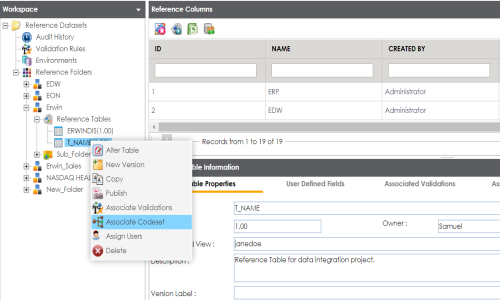
The Associate Codeset page appears.
For more information on codesets, refer to the Maintaining Enterprise Codesets section.
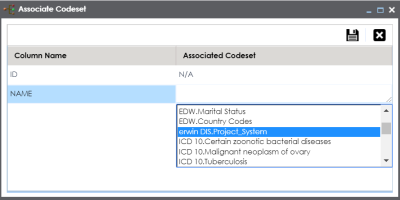
The codeset is associated with the column of the reference table.
The corresponding column in the reference table is now configured as a drop-down and populated with values from the selected codeset.
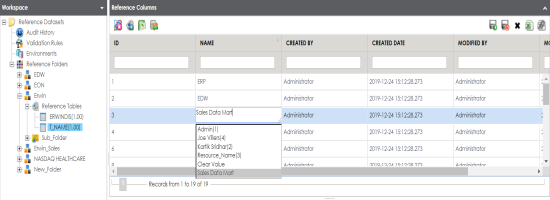
Note: Ensure that you are in edit mode.
|
Copyright © 2020 erwin, Inc.
All rights reserved.
|
|